
How to Open Exness Account Step by Step – I get it—waiting feels safe. But if you’re ready to deposit, delaying only lets opportunities slip. 靈活性 offers fast execution, competitive spreads, and a streamlined signup flow. This guide strips away the friction so you can register, verify, and fund your account in one smooth, confident move.
Quick prerequisites (2-minute check)
- Valid ID (Passport/National ID) for KYC
- Proof of address: utility bill/bank statement ≤ 3 months
- Active email and phone number able to receive SMS/WhatsApp
- Card, e‑wallet, or online banking for deposits
- Stable internet and a secure device
Tip: Prepare clear, color photos of your documents (all corners visible). Your account name must match your documents exactly.
Step 1 — Create your account (±2 minutes)
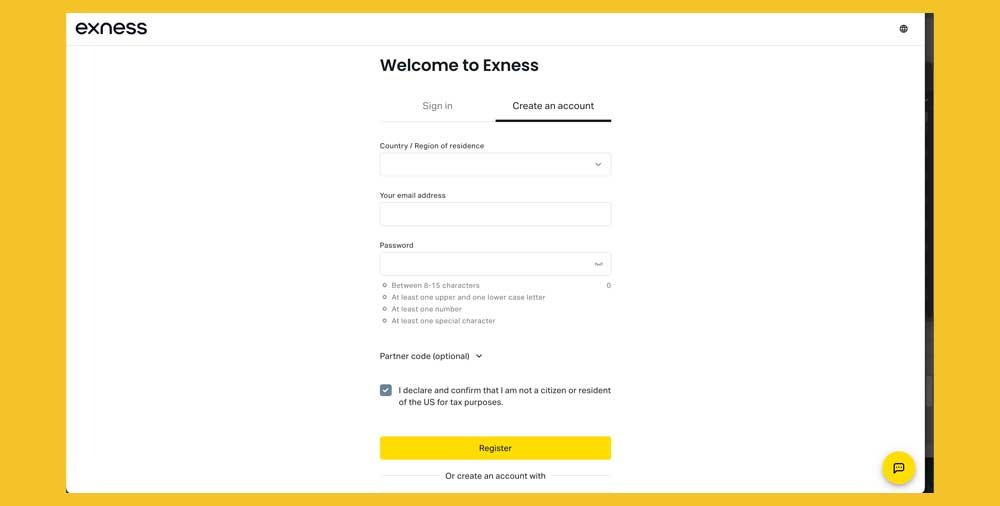
- Go to the official Exness website and click Sign Up – Exness Website Link.
- Enter your email, create a strong password, and select your country of residence exactly as per your ID.
- Accept the terms and policies.
- Verify your email using the link sent to your inbox.
Avoid: Using a temporary email or inactive phone number—it blocks verification and recovery later.
Step 2 — Complete profile & security (±3 minutes)
- Fill in personal details exactly as on your ID/passport.
- Enable two-factor authentication (2FA) via SMS or an authenticator app.
- Set a security PIN for transactions if prompted.
Avoid: Typos in your name or address. Even minor mismatches can trigger KYC rejections.
Step 3 — Verify identity (KYC) (±5–30 minutes)
- Upload your ID (front and back for National ID, or Passport photo page).
- Take a live selfie as instructed (no glasses/hats, good lighting).
- Upload proof of address (bank statement/utility bill ≤ 3 months with matching address).
Processing time: Usually instant to a few hours. If images are blurry or cropped, allow 24h+.
Avoid: Dark photos, harsh flash, cropped edges, or edited files.
Step 4 — Choose your Exness trading account type (±2 minutes)
- Standard (flexible, good for new traders)
- Pro/Raw Spread/Zero (ultra-tight spreads, transparent commissions—great if you’re ready to deposit)
Pick your platform: MT4/MT5 or the Exness Trade App—go with what you’re comfortable using.
Note: You can open multiple accounts with different base currencies to reduce conversion costs.
Step 5 — Make your first deposit (instant–a few minutes)
- Go to Personal Area > Deposit.
- Choose a local payment method, e‑wallet, or card.
- Select currency and amount (check the method’s minimum).
- Complete the payment authorization.
Estimated processing times:
- Local bank transfers & e‑wallets: instant–15 minutes
- Cards: instant–a few minutes
- Crypto: after network confirmations
Fees: Exness typically charges no deposit/withdrawal fees; charges may come from your bank/payment gateway and FX conversion. Choose a base currency that matches your funding source to minimize costs.
Avoid: Funding from third-party accounts—often rejected and can slow withdrawals later.
Step 6 — Set up platform & log in (±3 minutes)
- Get your trading credentials (login, server, password) from your Personal Area.
- Download MT4/MT5 or use the Exness Trade App.
- Log in with your trading account ID (not your email).
- Check server connection and market hours.
Avoid: Selecting the wrong server (Real vs Demo) or copying an incomplete password.
Step 7 — Test the essentials (±5 minutes)
- Open a small position to check execution.
- Observe real-time spreads and swaps.
- Try partial close and tweak SL/TP.
- Do a small withdrawal to confirm your payment route works end-to-end.
Common mistakes that slow you down
- Unreadable or expired KYC documents
- Account name not matching your card/bank account
- Choosing the wrong base currency (recurring FX conversion fees)
- Skipping 2FA and losing access later
- Not testing withdrawals early and discovering issues only when you need funds quickly
Safety and reliability—what matters
- Accounts protected by 2FA, encryption, and segregated funds (standard practices at regulated brokers)
- KYC helps prevent account misuse
- Your discipline matters: use trusted devices and networks only, rotate passwords regularly
Time to go live—realistic timeline
- Registration + profile: ~5 minutes
- KYC verification: instant–a few hours (clear documents can be near-instant)
- Deposit: instant–15 minutes (method-dependent)
If your documents are ready, many traders go live in under 30 minutes.
Fees snapshot
- Deposit/Withdrawal: usually free from Exness (check third-party fees)
- Commission: 0 on Standard; fixed commissions on Raw/Zero in exchange for tighter spreads
- Swap: varies by instrument and overnight holdings
- Conversion: applies if base currency ≠ funding currency
Want a deeper look or a head start?
- Explore features and pros/cons here: [Exness broker review]
- Check welcome offers here: [Exness welcome bonus]








 English
 Afrikaans
 Arabic
 French
 Indonesian
 Portuguese
 Thai
Thai Japanese
 Chinese (China)
 Spanish
 Uzbek
Uzbek Vietnamese
 Hindi
Hindi Urdu
Urdu German
 Turkish
 Russian
 Italian
 Polish
 Chinese (Taiwan)
 Chinese (Hong Kong)